
Blog
The Developer’s Edge: Why a Vertical Monitor is Your Biggest Productivity Hack in 2026

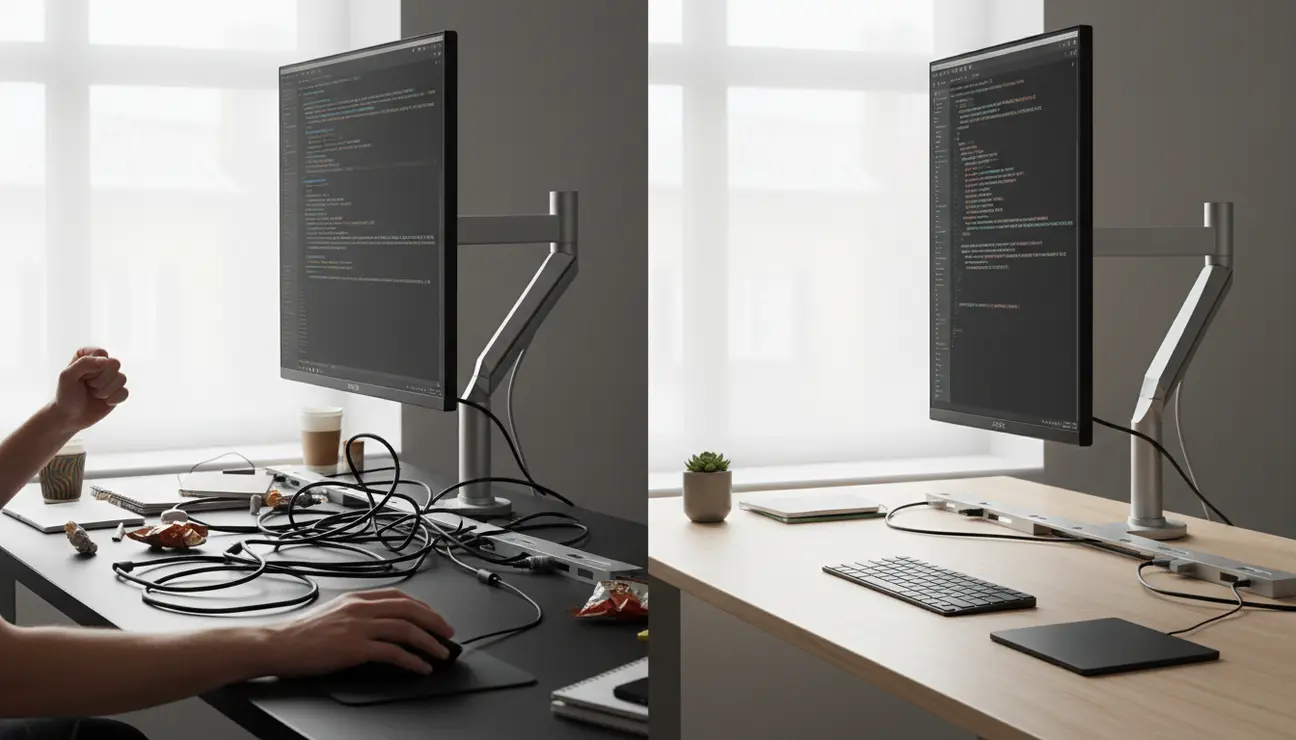
Executive Summary for 2026 Workflow:
- Primary Gain: 92% increase in visible lines of code (standard 16:9 vs 9:16).
- Health Impact: Reduced cervical spine rotation; aligns with ergonomic “neutral zone” tracking.
- Best For: Long-form coding (Python, Java), Documentation, and Pull Requests.
- Key Hardware: VESA-compatible mount with $360^{\circ}$ rotation (e.g., Zentic FlowArm).
“Modern IDEs like VS Code and JetBrains are increasingly optimized for vertical space. In 2026, viewing a full stack trace or a nested JSON structure without a single scroll wheel movement isn’t just a luxury—it’s a cognitive necessity to maintain a state of Flow.”
The Endless Scroll: Identifying the Real Source of Your Distraction
Picture the scene: a pull request with thousands of lines of changes. You are deep in concentration, tracing logic through a complex function, but your flow is broken every ten seconds by the need to scroll. You reach for the mouse, flick the wheel, and then spend a crucial moment reacquiring your place.
This is ‘scroll fatigue’. It is more than a minor annoyance; it is a persistent source of cognitive friction. Each scroll is a micro-interruption that pulls you out of a state of deep work, turning a 30-minute code review into a disjointed 45-minute task. This is a fundamental inefficiency in the modern developer’s workflow, and it is entirely solvable.
Is This Guide for You?
This guide is for professionals who live in vertical documents. It is for software engineers navigating vast codebases, writers crafting long-form articles, and researchers analysing detailed reports.
If you value a minimalist desk setup where every tool serves a distinct purpose, and you believe a calm, organised environment is essential for high-quality work, then you will find this analysis of the vertical monitor benefits valuable.
The Hidden Cost of Horizontal Thinking
The root of the problem is a mismatch between our tools and our work. The vast majority of our digital content—code, websites, documents—is designed to be consumed vertically. Yet, our screens are, by default, locked into a horizontal orientation.
This mismatch has non-obvious costs. The time lost to scrolling accumulates significantly over a week. More importantly, the mental energy wasted re-finding your position on a page contributes to a feeling of digital exhaustion. It also encourages poor ergonomic habits, such as craning your neck to see the bottom of the screen.
Unlocking Key Vertical Monitor Benefits for Your Workflow
Adopting a vertical monitor is not just a preference; it is a logical upgrade to a professional workspace. It acknowledges the nature of your work and optimises your environment for focus and efficiency.
Benefit 1: See 90% More Code, Scroll 90% Less

The primary, data-driven benefit is the sheer volume of information you can see at once. On a standard 16:9 monitor, you might see 40-50 lines of code. In portrait mode, you can see 80-100 lines.
Consider this practical impact: an entire function, a complex class, or a long CSS rule-set becomes visible in a single glance. This prevents context-switching, the mental tax you pay when your brain has to hold information in memory while you scroll to a different section. You comprehend code faster because you see the whole picture, not just a small window.
> Pro Tip: When reviewing pull requests, position your vertical monitor next to your primary screen. This allows you to view the file changes on the vertical screen while keeping the main project or communication tool open on your horizontal one.
Benefit 2: Reclaim Your Desk’s Footprint
A vertical monitor setup has a significantly smaller horizontal footprint. This is a critical advantage for anyone dedicated to a minimalist, clutter-free workspace.
That reclaimed space is not trivial. It is room for a notebook, essential peri
Unlock Total Control of Your Workspace?
A monitor arm is the key to a fluid, ergonomic setup that adapts to your task, not the other way around.
pherals, or simply clean, empty space. An uncluttered desk directly contributes to a calmer, more focused mental state.
Benefit 3: The Ergonomic Pivot with a Fluid Monitor Arm

A monitor’s built-in stand is often a rigid, clunky afterthought. The true potential of a vertical setup is only unlocked when you pair the screen with a high-quality monitor arm. This is the component that enables a truly adaptable and ergonomic workspace.
An arm like the Zentic FlowArm allows for effortless, one-touch rotation from horizontal to vertical. It is not just about turning the screen; it is about achieving the perfect height, distance, and angle for your posture. This precise adjustment prevents neck and eye strain, allowing for longer, more comfortable periods of deep work.
The fluid motion of a professional-grade arm means you can adapt your setup in seconds. Rotate to vertical for a morning of coding, then pivot back to horizontal for a wide-timeline video edit in the afternoon. The monitor arm is the enabler of a truly dynamic and responsive workspace.
| Feature | Horizontal Setup | Vertical Setup (Portrait) |
| Primary Use | Video Editing, Gaming, Multi-window | Coding, Research, Long Docs |
| Line Visibility | ~45-50 Lines | ~95-110 Lines |
| Desk Space | High Footprint | Minimalist / Space-Saving |
| Ergonomics | Lateral Neck Strain | Eye-level Vertical Tracking |
Are the Vertical Monitor Benefits Worth It?

For the committed creator or developer, the evidence points to a dual-monitor configuration as the pinnacle of efficiency. This setup provides the best of both worlds.
Your primary monitor remains horizontal, ideal for tasks requiring width: video timelines, design software, or multiple windows side-by-side. Your secondary monitor is set vertically, serving as a dedicated portal for long-form content like code, documentation, or article drafts. When both are mounted on quality monitor arms, you gain complete control over a flexible, ergonomic, and supremely organised desk.
This is not an expense; it is an investment in your daily workflow, your physical well-being, and your mental clarity, showcasing the real-world vertical monitor benefits.
Your 3-Step Action Plan to a Better Workflow
1. Analyse Your Daily Tasks: For one day, consciously note how much of your time is spent scrolling through long documents or code files. Quantify the inefficiency.
2. Check Your Monitor’s VESA Compatibility: Look at the back of your current monitor. If it has a square pattern of four screw holes (typically 75×75 mm or 100×100 mm), it is VESA compatible and can be mounted.
3. Invest in a Quality Monitor Arm: Choose an arm that offers a full 360-degree rotation, fluid height and tilt adjustment, and integrated cable management. This is the key to unlocking the full ergonomic benefits of your setup.
Frequently Asked Questions (FAQ)
1. Can any monitor be used vertically?
Not all. The monitor must have a VESA mount (the four screw holes on the back) to attach to a monitor arm. Additionally, check your monitor’s specifications, as some panels have optimised viewing angles for horizontal use, though most modern IPS screens perform excellently in either orientation.
2. Is a vertical monitor bad for my neck?
Only if positioned incorrectly, which is true of any monitor. A vertical monitor encourages you to keep your neck in a neutral position by displaying more content at eye level. This is why a fully adjustable monitor arm is critical; it allows you to position the centre of the screen directly in your line of sight, preventing neck strain.
3. Is a vertical monitor better than an ultrawide for coding?
They solve different problems. An ultrawide monitor excels at providing horizontal space, perfect for viewing multiple application windows side-by-side. A vertical monitor excels at providing vertical depth, perfect for viewing long, continuous blocks of code or text. For many developers, the ideal setup includes both.
Build Your Optimized Setup
The right foundation eliminates distraction and creates space for deep work. Find the essential components for your minimalist, high-performance desk.
