
Blog
Desktop Speaker Placement: The Pragmatic Guide for Real Desks (Not Studios)

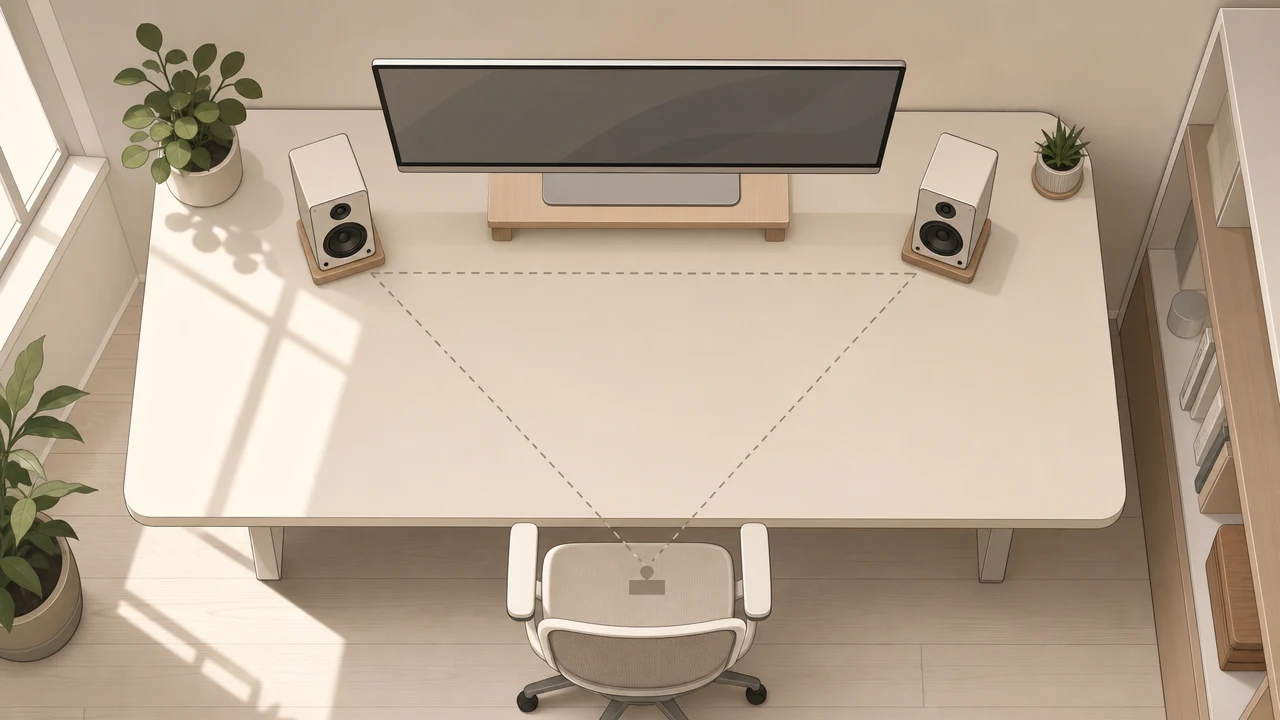
You don’t need to treat your room. You need to stop making the four mistakes everyone makes.
The 60-Second Answer: How Should You Position Desktop Speakers?
Place each speaker so the tweeter sits at ear height, angled inward (toe-in) so the imaginary lines from the speakers cross just behind your head. Keep the speakers and your ears equidistant — an equilateral triangle, with roughly 30 degrees of inward angle on each side. Pull the speakers 10–15 cm off the wall behind them, decouple them from the desk with foam isolation pads, and never lay them flat behind a monitor. Everything else is fine-tuning.
That’s the textbook answer. Here’s what nobody tells you: most desks violate at least two of those rules — and the fix usually costs under £30.
Why Most Desk Speaker Advice Online Is Wrong for You
Short answer: Most placement guides are written for studio monitors in treated rooms with free-standing speakers and a chair that can slide back two meters. Your desk is 120 cm wide, your monitor lives in the middle of it, and your “room treatment” is a curtain and a bookshelf. Generic advice optimizes for an environment you don’t have.
I looked at the top ten results for “desktop speaker placement” before writing this. Seven of them assume you can move the speakers freely in three dimensions. None of them mention what to do when your seated position is physically inside the equilateral triangle they’re recommending — which is the reality on most home office desks.
Here’s the gap: UK Office for National Statistics data shows 28% of working adults in Great Britain are now in hybrid arrangements, doing serious cognitive work from home offices that were never designed for it. A separate 2023 study of 232 computer-based homeworkers in the International Journal of Environmental Research and Public Health found that 40.9% use dining tables as their primary workstation, and 61.2% report musculoskeletal discomfort from their setup. These are not people with studio chairs and acoustic panels. They’re people with a desk in a corner of a living room.
So when an audio blog tells you to “form an equilateral triangle with 1.5 meters per side,” and your desk is 60 cm deep, you don’t have a triangle problem. You have a geometry-meets-reality problem. This guide is about that.
What “good enough” actually means
The goal here is not studio-grade reproduction. It’s catching the 80% of audio quality that most people are leaving on the table because of two or three placement mistakes — without buying acoustic panels, without rearranging the room, and without spending more than the price of a takeaway dinner.
Calm comes from things working, not from things being perfect. That applies to desks too.
The Four Mistakes That Kill Desktop Sound (And the £10–30 Fixes)
Short answer: The four most common mistakes are: tweeters below ear level (lost detail and fatigue), speakers shoved flat against the wall (boomy, smeared bass), no toe-in (collapsed stereo image), and speakers vibrating the desk itself (muddy mids in the same range as the human voice). All four can be fixed for under £30 — usually without buying new speakers.
Mistake 1: Tweeters below ear level
High frequencies are directional. They radiate forward in a narrow cone, unlike bass, which radiates in roughly every direction. If your tweeters sit below your ears — which is what happens when you put 20 cm tall speakers directly on a 75 cm desk and then sit upright — those highs physically miss your ears. The brain still hears something, but it’s a muffled version. Over a workday, that muffled version is what your auditory cortex spends extra energy reconstructing, and that energy is what becomes fatigue.
The fix: Raise the speakers so the tweeter is at ear height (or angled up toward your ears if you can tilt them). Isolation pads with a built-in tilt cost £10–20 and solve mistake 1 and mistake 4 simultaneously. For taller required height, a pair of small desktop stands does it for under £25.
Mistake 2: Speakers flush against the wall
Most desktop speakers vent bass either out the back or down through ports. When you push them tight against the wall behind your desk, those rear-facing bass waves hit the wall and bounce back into the room, arriving at your ears slightly after the original sound. The result is boom, mud, and a low-frequency response that depends more on the wall than on the speaker.
The fix: Pull each speaker 10–15 cm away from the wall behind it. That’s it. No money. Five seconds.
A quick way to verify: play a familiar bass-heavy track at moderate volume, then physically move the speakers 5 cm forward in steps. You’ll hear the bass tighten as you find the right distance. Stop when it stops improving.
Mistake 3: No toe-in (the most common one)
Your speakers should not point straight at the wall opposite the desk. They should point at you — specifically, the imaginary lines from the front of each speaker should cross just behind your head. That’s a 30-degree inward angle on each speaker, 60 degrees total.
The reason is the same as Mistake 1: high frequencies are directional. Genelec’s home studio guidelines, which are about as standard as it gets in this domain, mandate this equilateral triangle with 30-degree toe-in for any near-field setup. Off-axis listening means lost treble, lost spatial detail, and a stereo image that collapses into the center.
The fix: Angle each speaker inward. A visual marker that works: when you look straight at a properly toed-in speaker from your seated position, you should not see the side panel — only the front baffle. If you see the side, your toe-in is wrong.
The equilateral triangle ideal — equal distance between the two speakers, and from each speaker to your head — matters because audio research on bilateral listening (Burg et al., Ear and Hearing, 2022) shows that asymmetric stereo input actually requires more cognitive effort to process than monaural audio. A broken stereo image is worse than no stereo image at all. Your brain notices, even if you don’t consciously register why you’re tired at 4pm.
Mistake 4: Direct desk contact (and the cable problem nobody mentions)
A speaker is, mechanically speaking, a device that converts electrical energy into rapid back-and-forth physical movement. For every push of the speaker cone forward, an equal force pushes the cabinet backward. If that cabinet is sitting directly on your desk, that force enters the desk, and the desk becomes a second, much larger, much worse-sounding speaker.
The frequencies most affected by desk resonance sit roughly between 80 Hz and 200 Hz — which is exactly where the human voice’s fundamental tones live. This is why a call on a vibrating desk sounds boomy and slightly indistinct: the desk is adding its own muddy voice to the conversation. Your instinct is to turn up the volume to hear clearly, which pushes more energy into the desk, which worsens the problem.
The fix: Foam isolation pads. £5–15 a pair. They sit between the speaker and the desk and absorb the vibration before it transfers. Decent ones reduce structural resonance dramatically — manufacturer testing in this space typically claims 85–95% reduction, though independent verification varies. Either way, the difference is audible immediately. A folded mousepad works as a temporary test.
One side effect of raising speakers off the desk: cables become visible. You optimize for sound and end up with a desk that looks worse. A £5 cable channel or a pack of velcro ties solves this — and it’s worth doing, because visual clutter raises the same low-grade cognitive load that bad audio does. The Princeton Neuroscience Institute’s 2011 fMRI work by McMains and Kastner showed that multiple visual stimuli compete for neural representation in the brain, mutually suppressing each other’s processing. Saxbe and Repetti’s UCLA study (2010, Personality and Social Psychology Bulletin) went further and linked household clutter to flatter diurnal cortisol slopes — a stress marker. The point isn’t that messy cables are stressful. The point is that they’re a tax you’re paying without noticing.
When Your Desk Is Too Small: The Compromise Hierarchy
Short answer: When you can’t follow all the rules, prioritize in this order: (1) ear height, (2) toe-in angle, (3) symmetry, (4) wall distance, (5) isolation. Height and toe-in are non-negotiable. Everything below them is a graceful compromise.
Setup A: Speakers either side of a 27″ monitor
This is the most common case. Your speakers sit at the left and right edges of a 120–140 cm desk, with a monitor in the middle. The triangle is roughly: speakers 60–80 cm apart, your ears 70–90 cm away. That’s not a textbook equilateral triangle, but it’s close enough to work — provided you get the toe-in and the height right.
Watch for: the monitor itself reflecting high frequencies back at you. If voices sound slightly harsh or sibilant, try reducing the toe-in by a few degrees, or tilting the speakers up rather than aiming them directly across.
Setup B: Limited width (100 cm desk or less)
You don’t have room for proper stereo separation. Two options:
- Vertical stands behind the monitor, raising the speakers above it. This lets you spread them wider than the desk allows.
- Wall mount. Cheap, effective, frees up desk space, and forces you to think about toe-in deliberately.
When to give up on stereo entirely: if you’re using the speakers mostly for video calls, system sounds, and occasional music — not for critical listening — a single decent mono speaker or a small soundbar can deliver better results than a compromised stereo pair. Stereo only matters when the source material is mixed for stereo and you’re sitting in the right spot.
Setup C: Asymmetric room (corner desk, one side wall)
The hardest case. If one speaker is 20 cm from a side wall and the other is 2 meters from anything, the room will color them differently — the close one will sound boomy and louder in the bass, the far one will sound thin. You’ll feel like the audio is “leaning” to one side even when the volume is balanced.
The trick: make both speakers equally awkward. Equal distance from any wall, even if that distance isn’t ideal. Symmetry of error beats symmetry-toward-perfection-on-one-side-only.
If that’s not possible, this is the situation where a soundbar genuinely beats stereo. Two compromised speakers in a corner setup is worse than one well-placed mono source.
The Calm Desk Layer: Why This Matters Beyond Audio Quality
Short answer: Good speaker placement isn’t only about better sound. It reduces listening fatigue, lets you hear detail at lower volumes (which protects long-term hearing), and stops your brain from constantly compensating for an imbalanced stereo image. Over a workday, this matters more than the last 5% of audio fidelity.
Listening fatigue is real and measurable
When stereo audio is asymmetric — speakers at unequal distances, one closer to a wall, one off-axis — the brain has to work harder to decode it. The Burg et al. work I cited earlier showed that imbalanced bilateral listening requires more cognitive effort than monaural listening. Most people experience this as “I’m tired by 4pm and I don’t know why.” Audio is rarely the first suspect. Sometimes it should be.
Lower volume = less strain over an eight-hour day
The EPA recommends a long-term average exposure of no more than 70 dBA over 24 hours to fully prevent hearing damage. The WHO sets the workplace recommendation at 80 dBA over 40 hours per week. NIOSH allows 85 dBA over an 8-hour shift (J. Acoust. Soc. Am., 2023). Because the dB scale is logarithmic, 80 dBA contains ten times the acoustic energy of 70 dBA. That’s not a small difference.
Proper placement matters here because it lets you hear detail at lower volumes. When the audio reaches your ears cleanly — at the right height, with proper toe-in, without desk resonance smearing the mids — you can drop the volume by several dB and still hear everything you need. Over years of remote work, that compounds.
| Setup | Desk width | Speaker placement | Watch out for |
|---|---|---|---|
| A. Standard | 120–140 cm with 27″ monitor | Speakers either side of monitor, 60–80 cm apart, raised to ear height | Monitor reflecting harsh highs — reduce toe-in slightly if voices sound sibilant |
| B. Tight | 100 cm or less | Vertical stands behind monitor, wall mount, or single mono soundbar | Stereo separation suffers — accept mono if material is mostly voice/calls |
| C. Asymmetric | Corner desk, one side wall close | Make both speakers equally awkward — equal distance from any wall | Soundbar often beats stereo here. Don’t fight room geometry |
When silence is the right answer
Honest aside: I personally don’t listen to anything during deep focus work. No music, no ambient, no podcasts. For analytical work, audio is a tax I can’t afford. The speakers on my desk are for video calls and the occasional end-of-day decompression.
If that’s you too — this guide still matters. System sounds, meetings, the music you put on after the work is done. The setup pays off in those moments. And if you’re someone who does work to music or background sound, the case for getting placement right is even stronger, because that’s eight hours a day of audio reaching your ears.
Quick Buying Checklist (If You’re Replacing Speakers Anyway)
Short answer: If you’re upgrading, look for: 4–5 inch drivers (sweet spot for desk distance), front-firing bass ports (less wall sensitivity), built-in DAC or USB-C input (cleaner signal path), and a physical volume knob within arm’s reach (you’ll use it daily). Skip: Bluetooth-only models for desk use, RGB-heavy “gaming” speakers that prioritize lights over drivers, and anything taller than 30 cm — it won’t fit properly on a desk anyway.
Five specs that actually matter at desk distance
- Driver size: 4–5 inches is ideal for typical 70–90 cm listening distance. Bigger isn’t better when you’re sitting this close.
- Bass port direction: Front-firing forgives bad wall placement. Rear-firing punishes it.
- Inputs: USB-C or built-in DAC means cleaner signal than analog through a noisy motherboard.
- Physical controls: A knob you can reach without alt-tabbing. Sounds trivial, isn’t.
- Cabinet size: Measure your desk. If the speakers are taller than your monitor stand, they’re wrong for the desk.
Specs that don’t matter as much as marketing claims
- Watts. Peak watts versus RMS watts is mostly marketing. You need maybe 20 RMS watts for a desk. More just means more potential damage.
- Bluetooth codec. Irrelevant for a wired desk speaker. If you care about Bluetooth audio quality, that’s a headphones conversation.
- Subwoofer. Probably overkill for WFH. The desk-resonance problem gets worse with a sub, not better, unless the sub is properly isolated on the floor — which means more decoupling, more spend, more setup.
FAQ
How far apart should desktop speakers be?
About the same distance as your ears are from each speaker — that’s the equilateral triangle rule from Genelec’s home studio guide. For a typical desk setup, that means roughly 60–80 cm between speakers if you’re sitting 70–90 cm away. If your desk is narrow, prioritize getting the toe-in right over forcing wider separation.
Should desktop speakers be at ear level or above?
At ear level for the tweeter specifically — not the center of the speaker. High frequencies are directional, so the tweeter axis needs to point at your ears. If the speaker has the tweeter on top, you can place it lower; if the tweeter is centered, the whole speaker needs to sit higher.
Do I need a subwoofer for desk speakers?
Probably not. At desk listening distances, well-placed 4–5 inch drivers produce more than enough bass for normal work, music, and calls. A subwoofer adds desk-resonance problems unless it’s properly isolated on the floor, plus the cost of decent isolation accessories. Skip it unless you specifically work with bass-heavy content.
Why do my speakers sound muddy on my desk?
Almost always one of three things: speakers vibrating directly into the desk (fix: isolation pads), speakers too close to the wall behind them (fix: pull them 10–15 cm forward), or no toe-in causing phase issues (fix: angle them at 30 degrees inward). Try those three before assuming you need different speakers.
Is toe-in always necessary?
Yes, in any near-field setup. High frequencies are directional, so if the tweeters aren’t pointing at your ears, you’re losing detail and the stereo image collapses. The exception is some coaxial speakers (where the tweeter sits inside the woofer), which have wider dispersion and tolerate less precise aiming — but they’re a small minority of desk speakers.
Do speaker isolation pads actually make a difference?
Yes, and it’s audible immediately. Desk resonance smears low-mid frequencies — exactly where human voices live — so isolating the speakers cleans up vocal clarity in calls and music. A folded mousepad works as a temporary test before you spend money on proper pads.
What I’d Skip (Honest Limitations)
A few things this guide doesn’t pretend to do:
- It assumes you already own speakers. If you’re starting from zero with a £50 budget, a decent pair of wired headphones will probably outperform anything you can buy in that price range. The placement advice here is most valuable for people in the £80–300 speaker range.
- I haven’t bench-tested every isolation pad on the market. The principle — decouple the speaker from the desk — matters more than the specific brand. Foam, neoprene, sorbothane, mousepad-as-temporary-test: they all work to varying degrees. The cheap ones are good enough for most desks.
- “Calm” through audio is real but small. If your workday stress comes from your manager, your inbox, or unclear priorities, no amount of speaker placement will fix it. This guide is about removing a low-grade environmental cost that compounds over years — not about transforming your relationship to work.
- Room acoustics are real and not covered here. A truly bad room (echoey, parallel walls, hardwood floors everywhere) will limit how much placement alone can do. That’s a different article.
If you’re rethinking your desk audio setup, we curate compact, desk-friendly speakers and accessories built for small spaces at ZenticStore Desk Audio Collection.
Sources cited: Burg et al., Ear and Hearing (2022); J. Acoust. Soc. Am., PMC10194210 (2023); UK ONS, Q1 2025; International Journal of Environmental Research and Public Health, PMC9967171 (2023); Genelec Home Studio Audio Monitoring Guide (2023); McMains & Kastner, Journal of Neuroscience (2011); Saxbe & Repetti, Personality and Social Psychology Bulletin (2010).
Written by Viraboh for ZenticStore — Tech That Brings Calm.Share
