
Blog
7 Essential Components for a Minimalist All-Black Desk Setup (2026 Guide)

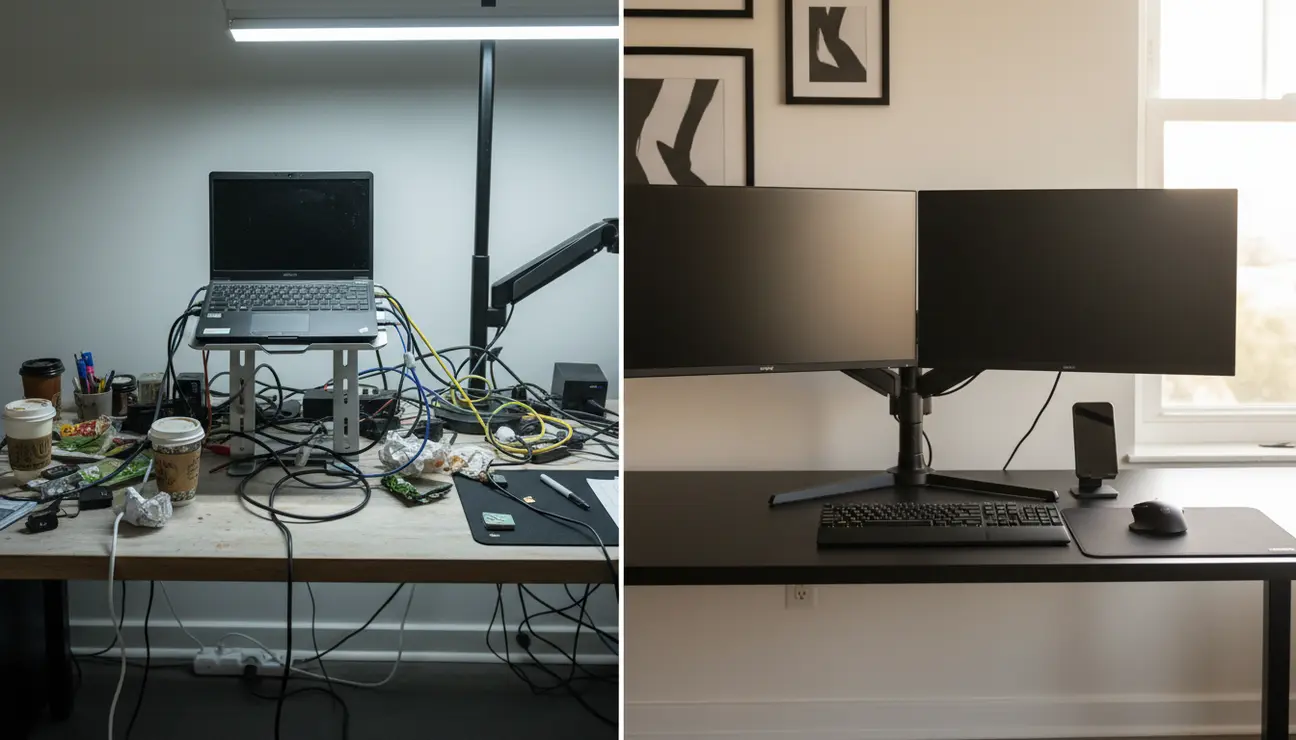
Visual clutter and cable chaos are not just untidy; they actively sabotage focus by increasing cognitive load. The solution is a monochromatic, all-black desk setup built on core principles of ergonomics and organisation, designed to eliminate these distractions. The single most impactful change you can make to begin this process is implementing a comprehensive cable management system.
Why Your Current Desk Is Costing You Focus
The compile is running. Your eyes drift from the terminal, and instead of a clear space to rest, they land on a chaotic nest of white, red, and blue cables. You notice the glare from the overhead light on your cheap, silver laptop stand. Each point of mismatched colour and tangled wire is a tiny, unnecessary demand on your brain’s resources.
This constant, low-level visual noise directly contributes to cognitive load. It fragments your attention and pulls you out of a state of deep work. An all-black desk setup is not an aesthetic trend; it is a logical, function-first strategy for creating an environment where focus is the default state.
Is This Productivity Blueprint for You?

This guide is engineered for the remote professional, software developer, or creative who understands that their environment is a tool. It is for those who believe a clean workspace leads to clean code and clearer thoughts.
If you prioritise function-driven minimalism and are ready to build a workspace that actively works to calm your mind and sharpen your focus, you are in the right place.
Item 1: The Foundation – The Non-Reflective Desk Surface
The Chaos: Glossy or light-coloured desks create glare and visual distractions. They reflect overhead lights and screen glow, causing persistent, low-grade eye strain over a long workday.
The Zen: A matte black desk surface absorbs light, creating a calm, uniform canvas for your work. It eliminates distracting reflections, allowing your monitor and your thoughts to be the sole points of focus. The deep, non-reflective colour establishes a high-contrast backdrop that makes every item on it feel intentional.
- Pros: Reduces eye strain, creates a high-contrast backdrop for peripherals.
- Cons: Shows dust and fingerprints more easily, requiring frequent wiping.
> Pro Tip: Choose a solid wood desk painted matte black over a laminate finish. The subtle texture adds warmth and durability, preventing the setup from feeling sterile.
Item 2: The Ergonomic Centrepiece – The Monitor Arm
The Chaos: The chunky plastic stand that comes with your monitor is an ergonomic failure. It consumes valuable desk space and offers minimal adjustment, forcing you into a posture that leads to neck and shoulder strain.
The Zen: A slim, black monitor arm is the functional core of a minimalist setup. It elevates your screen to the perfect eye level, enforcing better posture, and frees up the entire desk surface beneath it. This single change transforms the desk from a cluttered surface into a clean, open plane.
- Pros: Vastly improves ergonomics, reclaims valuable desk real estate.
- Cons: Requires a desk with a compatible thickness (typically 10-85 mm) for secure clamping.
> Data Point: Positioning the top of your monitor at or slightly below eye level can reduce neck flexion by up to 15°, mitigating long-term strain.
Item 3: The Input Devices – A Tactile, Backlit Keyboard & Mouse

The Chaos: Generic, grey plastic peripherals with loud branding and mismatched cables add layers of visual noise. Their disparate shapes and colours create a discordant, unprofessional aesthetic that detracts from a feeling of control.
The Zen: A unified keyboard and mouse set in matte black provides a seamless interaction loop. Opt for a mechanical keyboard with subtle, adjustable white backlighting for clarity in low-light conditions. The consistent aesthetic and tactile response make the physical act of working feel more cohesive and intentional.
- Pros: Creates a cohesive look, backlighting aids typing in all light conditions.
- Cons: High-quality mechanical keyboards can be a significant investment.
> Efficiency Tip: Choose a tenkeyless (TKL) keyboard to bring your mouse closer to your body’s centreline. This small change significantly improves shoulder and wrist ergonomics.
Item 4: The Final 10% – The Zentic Stealth Cable Organiser
The Chaos: Even with black peripherals, a tangled mess of power and data cables creates visual chaos under and behind your desk. This is the single biggest failure point of most ‘minimalist’ setups, the lingering mess that undermines the entire effort.
The Zen: The Zentic Stealth Cable Organiser is the hero of this setup. Unlike flimsy plastic sleeves or basic ties, its premium, weighted fabric design completely conceals your cables in a single, elegant black column. It attaches magnetically to the desk leg or undercarriage, transforming the chaotic ‘cable nest’ into an invisible channel. This is the component that makes the setup feel truly complete and professionally executed.
- Pros: Eliminates all visible cable clutter, premium magnetic design is superior to basic ties.
- Cons: Requires a few minutes of planning during the initial setup for optimal routing.
> Mindset Shift: Treat cable management not as a chore, but as the final step in compiling your code. A clean backend (cables) leads to a flawless frontend (your workspace).
Item 5: The Illumination – The Focused Task Lamp

The Chaos: Harsh, blue-toned overhead lighting is a primary cause of screen glare and eye fatigue. It disrupts your circadian rhythm during late-night coding sessions, making it harder to disconnect and rest.
The Zen: A slim, black LED desk lamp or monitor light bar provides focused, warm light (around 3000K). It creates a ‘bubble’ of concentration, illuminating your immediate physical workspace without washing out the screen. This separation between ambient light and task light signals to your brain where its focus should be.
- Pros: Reduces eye fatigue, improves evening focus without disrupting sleep patterns.
- Cons: A monitor light bar may not fit all curved or unusually thick monitors.
> Pro Tip: Use a smart plug to automate your lamp to switch to a warmer tone after 7 PM. This simple automation reinforces your work-life boundary.
Eliminate Chaos?
A complete system for your cables and accessories is the foundation of a high-focus workspace.
Final Blueprint: Your Priority Action Plan
While every component contributes to the whole, the path to a distraction-free workspace has a clear order of operations. Do not attempt to acquire everything at once.
Start with the Zentic Stealth Cable Organiser. It delivers the highest impact-to-cost ratio by solving the most significant and universal source of visual clutter. Once your foundation is clean, systematically upgrade your monitor arm and lighting. This methodical approach ensures immediate, tangible gains in focus with each step. This methodical approach is the fastest way to achieve a truly professional all black desk setup.
Frequently Asked Questions (FAQ)
How do you keep an all-black desk setup from looking too dark?
The key is texture and light. Introduce subtle variations like a wood grain on the desk surface or a leather desk mat. Most importantly, use warm, focused lighting from a task lamp to create pools of light and shadow, which adds depth and prevents the space from feeling flat or oppressive.
Is an all black desk setup harder to keep clean?
It is different, not harder. Matte surfaces can show fingerprints more readily, but a simple wipe with a microfibre cloth is all that is required. The benefit is that the lack of visual clutter makes dust more obvious, which encourages you to maintain a cleaner space overall.
What’s the best budget-friendly first step to an all-black setup?
Start with comprehensive cable management and a large black desk mat. For under €50, these two items solve the biggest sources of visual noise (cable nests) and cover the largest surface area of your desk, creating an immediate and dramatic aesthetic improvement.
Ready to Optimise Your Setup?
Build a distraction-free environment with our curated collection of minimalist desk essentials.
